Your website is often the first impression people get of your business. But what happens when that first impression is outdated, slow, or difficult to use? A dated website doesn’t just look bad — it can lead to lost trust, lower conversions, and decreased search engine visibility.
If your website hasn’t been updated in a while, now is the time to take action. In this blog post, we’ll walk you through eight practical steps to help you fix your outdated website and bring it back to life.
1. Perform a Full Website Audit
Before making any changes, start with a comprehensive website audit. Assess every aspect — from design and content to performance and SEO.
Look for:
- Broken links and outdated pages
- Poor navigation or confusing layouts
- Non-mobile-friendly elements
- Slow-loading pages
- Missing or incorrect meta tags
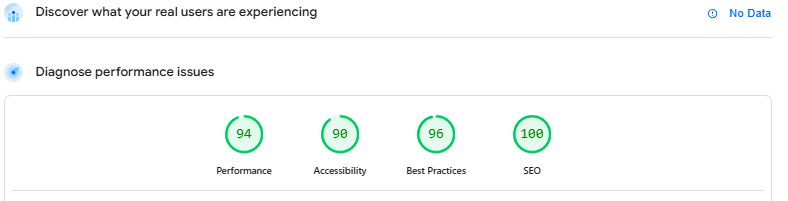
Use tools like Google PageSpeed Insights, GTmetrix, or Ahrefs for technical insights.
Google page speed -> Add url of your site > Click "Analyze"
2. Update the Design for a Modern Look
Visual design trends evolve quickly. If your site still looks like it was built a decade ago, visitors may leave before even reading a word.
Design tips for a modern feel:
- Embrace white space and minimalism
- Use modern typography and a consistent color palette
- Implement clear call-to-action (CTA) buttons
- Ensure brand consistency across all pages
Consider working with a designer or using modern website builders that follow current design standards.
3. Make It Mobile-Friendly
More than half of all web traffic comes from mobile devices. If your site isn’t responsive, you’re likely losing potential customers.
How to check:
- Use Google’s Mobile-Friendly Test
- Test your site on different screen sizes
- Optimize font sizes, button spacing, and navigation for touch screens
Responsive design isn’t just good for users — it also helps with SEO.
4. Improve Website Speed and Performance
Speed matters. A slow website leads to high bounce rates and lower search rankings.
Ways to boost performance:
- Compress images without losing quality
- Minify CSS, JavaScript, and HTML
- Enable browser caching
- Use a reliable hosting provider and consider a Content Delivery Network (CDN)
Speed optimization tools: Google PageSpeed Insights, GTmetrix, or WebPageTest.org.
5. Refresh Your Content
Old, outdated content can make your business appear inactive or irrelevant.
Update or remove:
- Old blog posts or news updates
- Outdated service or product descriptions
- Broken images and outdated stats
- Contact information, hours, or team bios
Add fresh content:
- New blog posts or case studies
- Updated FAQs and testimonials
- A compelling About Us page that reflects your current mission
6. Strengthen Your SEO
Fixing outdated SEO practices can dramatically improve your search engine visibility.
Steps to take:
- Update page titles, meta descriptions, and alt tags
- Use relevant keywords naturally in your content
- Submit an updated sitemap to Google Search Console
- Clean up broken links and redirect old URLs
- Optimize for local SEO if you’re targeting specific regions
7. Add New Functionalities
An outdated site may be missing features your visitors now expect.
Popular upgrades include:
- Live chat support
- Newsletter signup forms
- Social media feeds or share buttons
- Online booking or contact forms
- eCommerce features or online payment options
These functionalities can enhance the user experience and increase engagement.
8. Ensure Security and Compliance
Security is non-negotiable in today’s digital world. An outdated website is more vulnerable to hacks and data breaches.
Checklist:
- Install an SSL certificate (HTTPS)
- Update your CMS, plugins, and themes
- Implement regular backups
- Ensure your privacy policy is current
- Comply with regulations like GDPR or CCPA
Secure websites not only protect your visitors — they also rank better in search engines.
Final Thoughts
Revamping an outdated website can feel overwhelming, but taking it step-by-step makes the process manageable. Whether you DIY or hire a web professional, the payoff is worth it: a faster, more secure, and more engaging website that works for your business 24/7.